Tools & Resources · macOS app
Saige
A small menu-bar app that shows the API-equivalent cost of your AI coding sessions — live, as you work — so you build a working intuition for what a conversation, a refactor, or a swarm of subagents really costs. Saige reads the token usage that Claude Code and OpenAI Codex already record on your machine and prices it at published API rates, from an in-app rate table with an as-of date. Free, entirely on-device, no API key.
What it shows
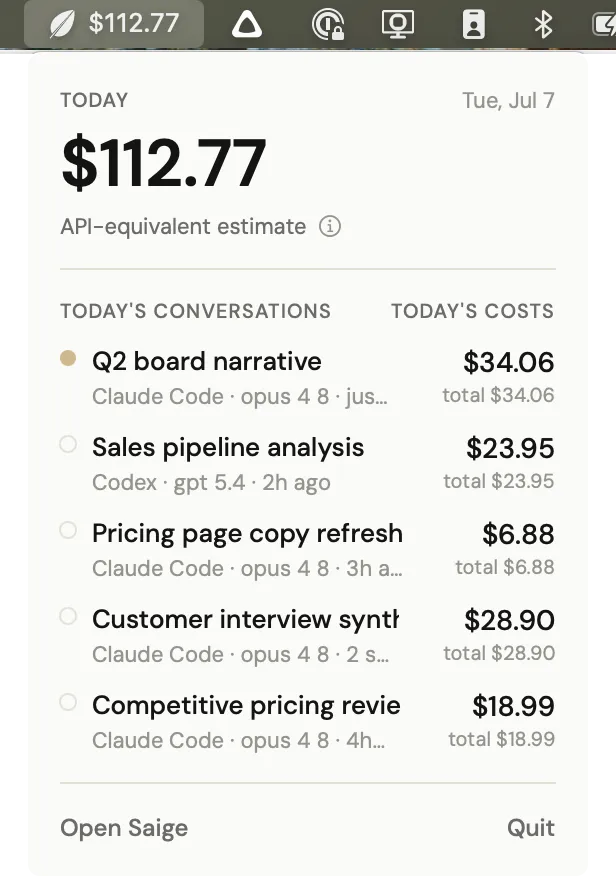
- Live cost of your active conversation, right in the menu bar
- Tracks both Claude Code and OpenAI Codex
- Reads local transcripts only — no API key, no account, no network
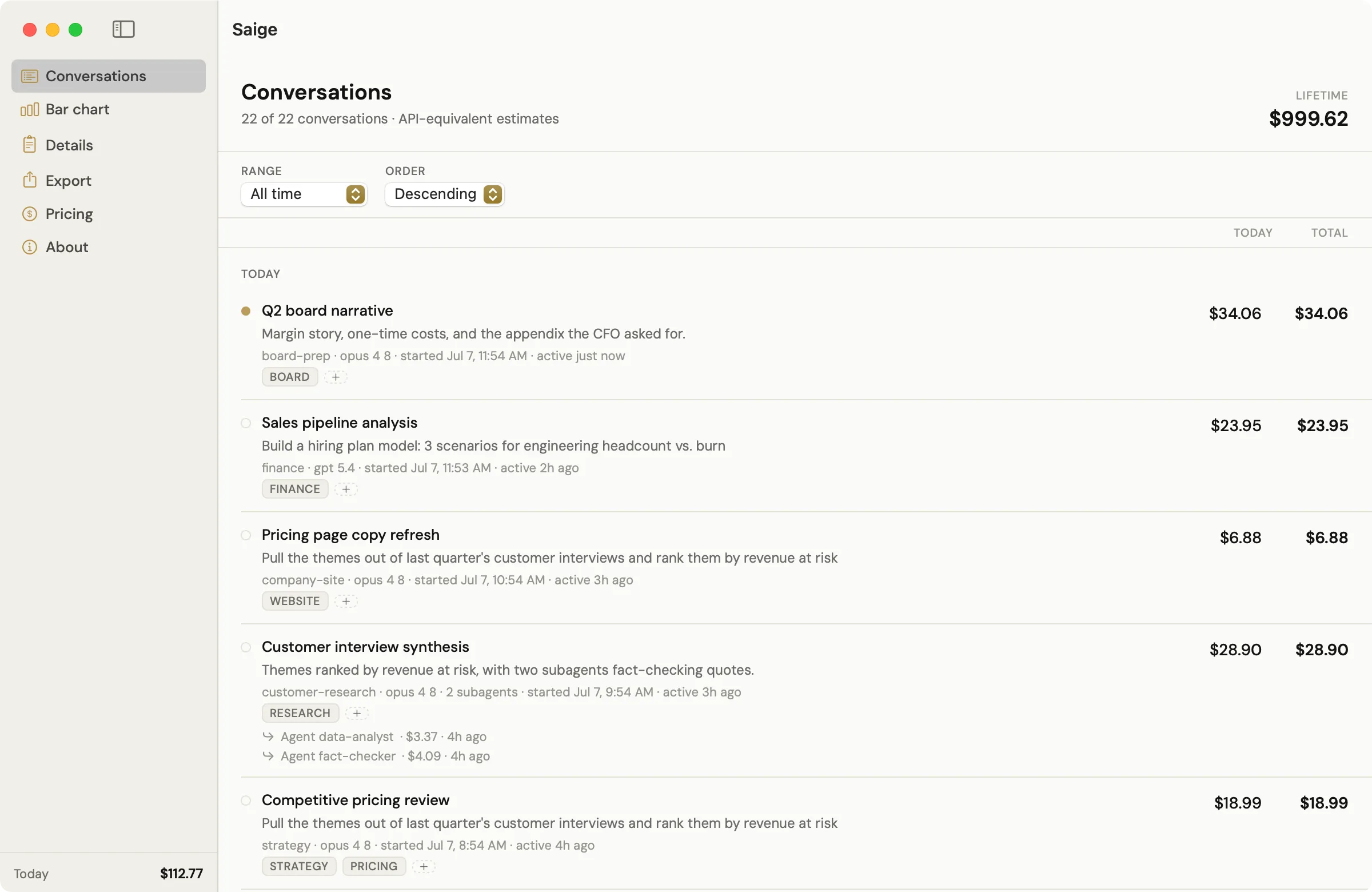
- Per-conversation history with inline rename, tags, and today vs. lifetime spend
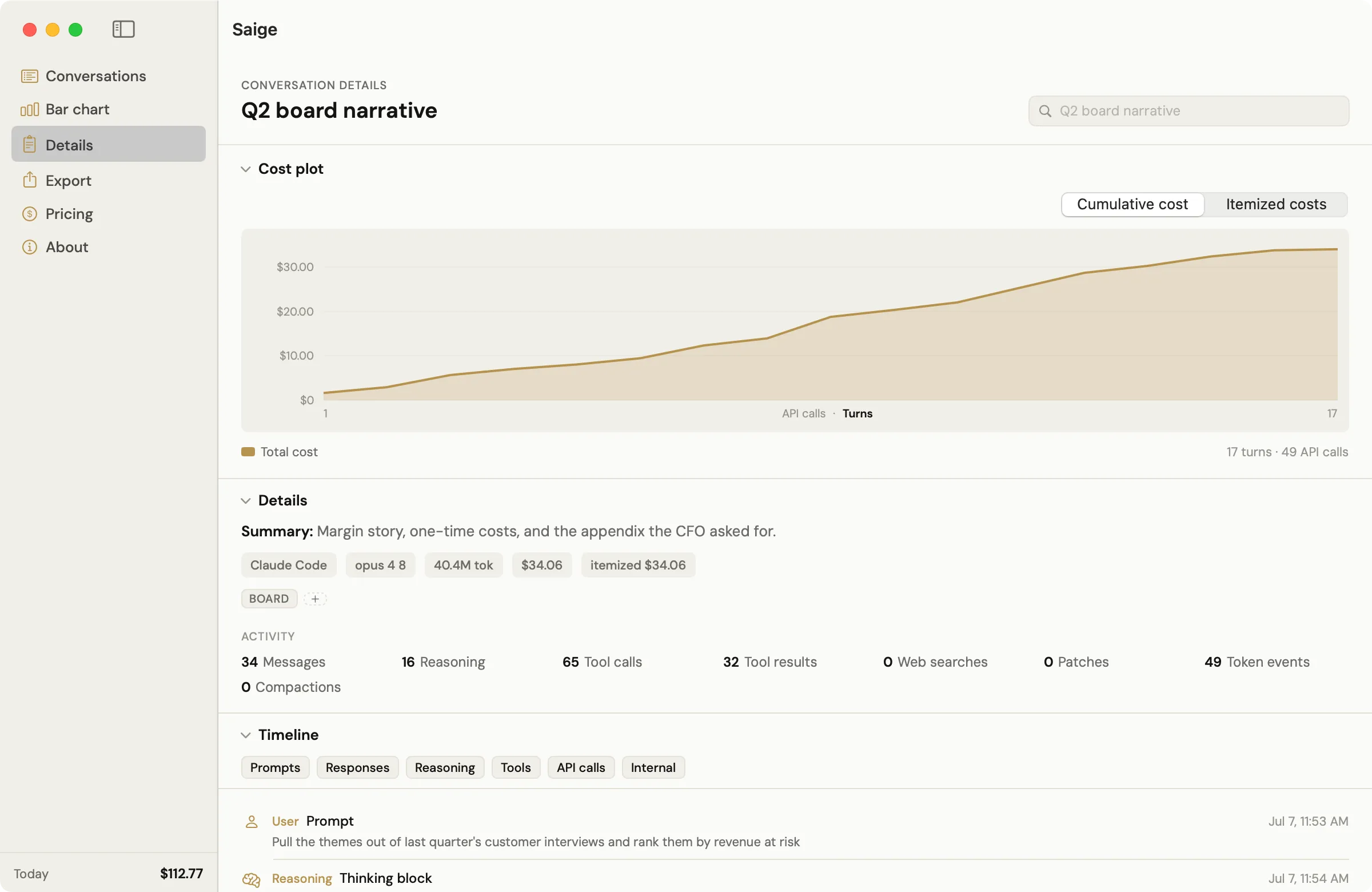
- A Details view per conversation — cumulative and itemized cost plots, a timeline that separates your prompts from harness-injected context, and per-API-call receipts
- Subagent costs rolled into the parent conversation, with a per-subagent breakdown
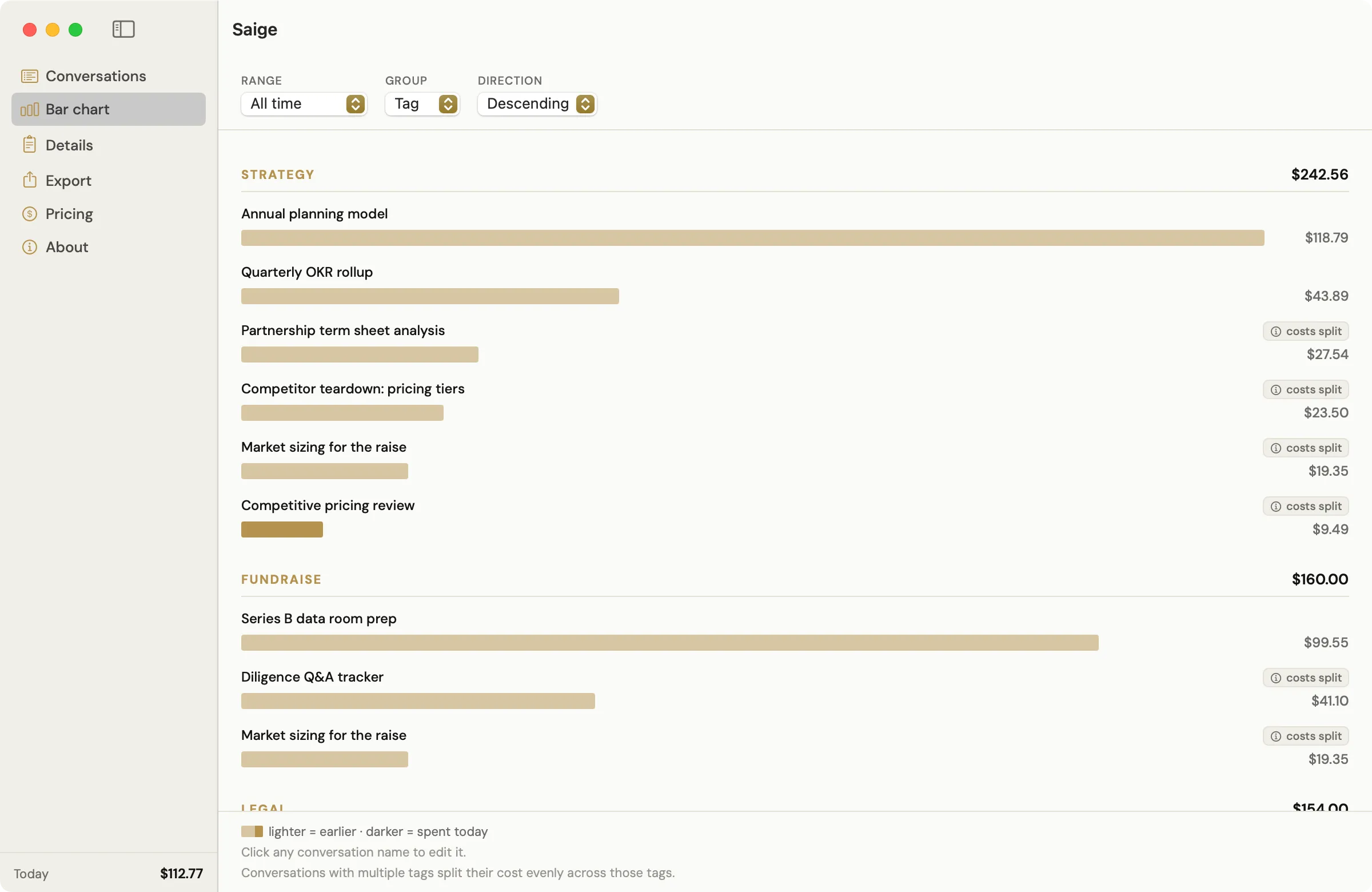
- Bar chart with tag grouping and cost splitting, plus one-click CSV export (tokens, per-model, per-subagent)
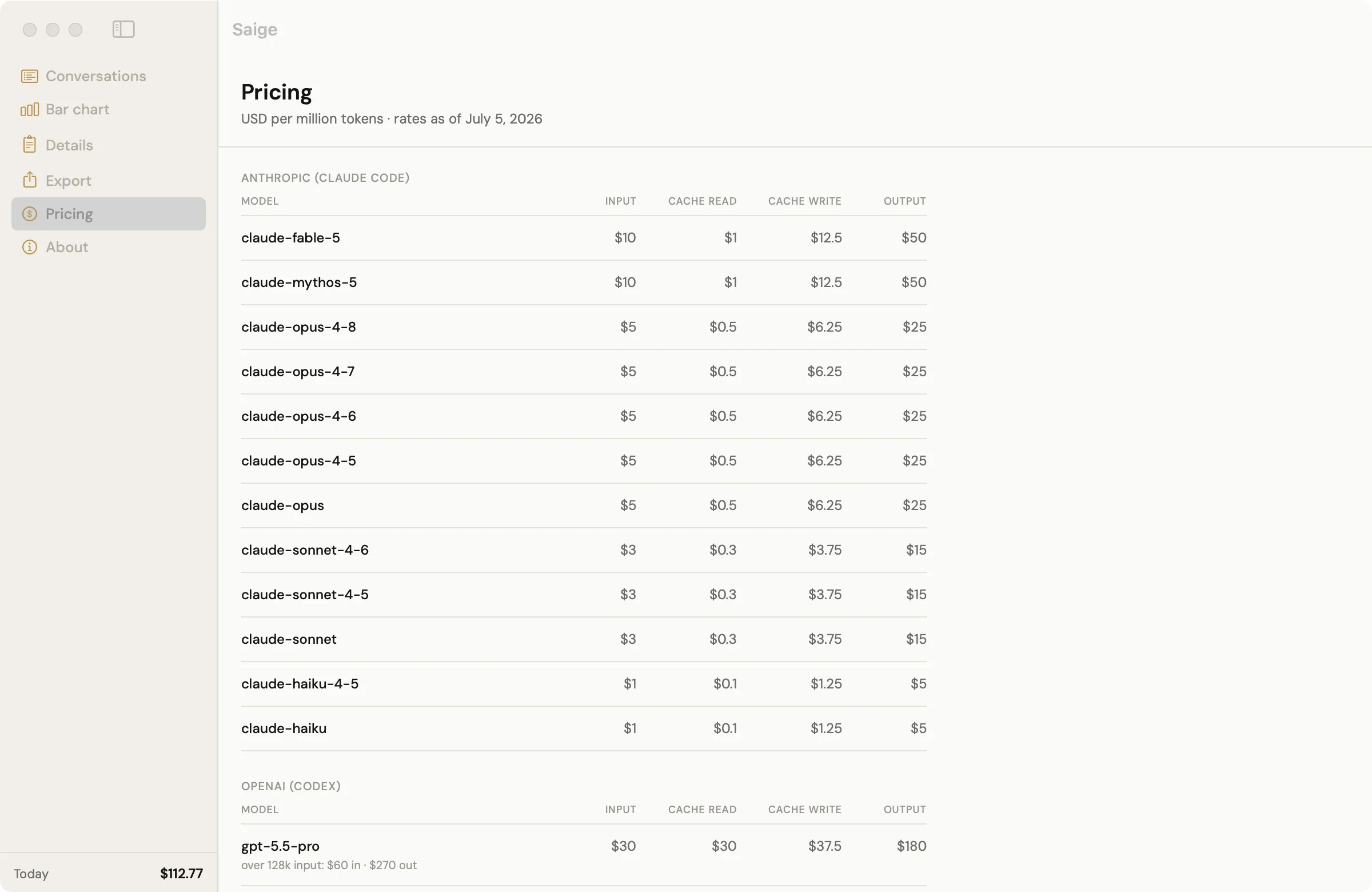
- A Pricing tab showing the exact per-model rates used, with an as-of date
Private by design
Saige makes no network connections and never touches an
API key. Every time Claude Code or Codex calls a model, it logs the
exact token counts locally — in ~/.claude and
~/.codex. Saige reads those counts and multiplies by a price
table. Nothing is sent anywhere; it works with your machine offline.
Costs are API-equivalent — what your tokens would bill at published API rates. Whether subscription usage is covered by your plan depends on your plan and provider and changes over time; check your provider's current billing terms. Saige reports API-equivalent value either way.
Installing
- Unzip and move Saige.app to your Applications folder.
- Double-click to open. Saige is signed with an Apple Developer ID and notarized by Apple, so it opens like any Mac app.
- It lives in your menu bar (not the Dock) and shows the day's cost. Click it for a dropdown of today's conversations — a gold dot marks the active one — and an Open Saige button. The window has Conversations, Bar chart, Details, Export, Pricing, and About tabs. Quit from the dropdown, or with ⌘Q.
Requires Claude Code and/or OpenAI Codex used on the same Mac — Saige reads the transcripts they write.
Questions
- Is Saige free?
- Yes. Free to download and use — no account, no ads, no analytics.
- Does Saige use my API key or send my data anywhere?
- No. Saige never uses an API key and makes no network connections. It reads the token-usage records that Claude Code and OpenAI Codex already write to your Mac (in ~/.claude and ~/.codex) and prices them entirely on-device.
- Does Saige work with OpenAI Codex as well as Claude Code?
- Yes. Saige tracks both Claude Code and OpenAI Codex sessions, with a per-model cost breakdown for each conversation.
- Will macOS warn me when I install it?
- Saige is signed with an Apple Developer ID and notarized by Apple, and opens like any Mac app — move it to Applications and double-click.
- What does "API-equivalent" cost mean?
- It's what your tokens would bill at published API rates — the rates in Saige's Pricing tab, with an as-of date. Whether subscription usage is covered by your plan depends on your plan and provider and changes over time; check your provider's current billing terms. Either way, treat the figure as a usage estimate.
- What do I need to run Saige?
- macOS 13 (Ventura) or later, on Apple Silicon or Intel, plus Claude Code and/or OpenAI Codex used on the same Mac — Saige reads the transcripts they write. Prices come from a built-in rate table you can inspect in the Pricing tab, with an as-of date.
- Does Saige track subagent costs?
- Yes. Costs from subagents are rolled into their parent conversation's total, with a per-subagent breakdown in the Details view and in the CSV export.
- Why track costs I'm not billed for?
- To build cost intuition. Today's per-token prices are heavily subsidized, so what you see in Saige is a lower bound on what your workflow really consumes. Knowing which conversations, models, and habits drive cost is how you stay ahead of the bill when it arrives.
Saige is built and maintained by K E Frailey.